Tuesday, 27 February 2018

How to Do Database Connection in Selenium

Sometime in testing we need to validate data in database also or need to extract data from database. There are many type of database availabe now a days like MySQL, SQL, Oracle ect.

In this article we will see how to connect to database and execute query with selenium webdriver.

If we want execute query into database then we have to connect to that database first.

If you are using C# in Selenium then please go to below URL.
How to Do Database Connection in Selenium C#

How to connect to database?

Database would be local or on server also. So we need to first set class for database.

Syntax:

1
2
3
Class.forName("com.mysql.jdbc.Driver"); // For Local

Class.forName("com.microsoft.sqlserver.jdbc.SQLServerDriver"); // For on server

Now we have to connect database.

Syntax:

1
sqlConnection = DriverManager.getConnection("ConnetionString", "Username", "Password"); 

We are done with database connection. Now, we have to execute query on database.

Syntax:


1
2
Statement st = sqlConnection.createStatement();
ResultSet rs = st.executeQuery(vQuery);

You get result of query in object of Resultset. you can use resultset values as per your requirement.Once you are done with your stuff then you have to close database connection.

Syntax:


1
sqlConnection.close();

Please go to below blog for database operation in selenium wrapper automation.

Database Operation with Selenium Wrapper Automation


Database Operations with Selenium Wrapper Automation

When you need to connect with database and execute query then you have to do first connect with your database then execute query.

Suppose you have scenario in that you need to execute lots of query and get result and verfy the result. So, for that every time you need to open connection, execute query and close connection. It is not good approach for any framework.

I have created one class 'DatabaseOperations' for different operation on database. you can use this class into your automation framework and use all methods of it with object of this class.


  1
  2
  3
  4
  5
  6
  7
  8
  9
 10
 11
 12
 13
 14
 15
 16
 17
 18
 19
 20
 21
 22
 23
 24
 25
 26
 27
 28
 29
 30
 31
 32
 33
 34
 35
 36
 37
 38
 39
 40
 41
 42
 43
 44
 45
 46
 47
 48
 49
 50
 51
 52
 53
 54
 55
 56
 57
 58
 59
 60
 61
 62
 63
 64
 65
 66
 67
 68
 69
 70
 71
 72
 73
 74
 75
 76
 77
 78
 79
 80
 81
 82
 83
 84
 85
 86
 87
 88
 89
 90
 91
 92
 93
 94
 95
 96
 97
 98
 99
100
101
102
103
104
105
106
107
108
109
110
111
112
113
114
115
116
117
118
119
120
121
122
123
124
125
126
127
128
129
130
131
import java.sql.Connection;
import java.sql.DriverManager;
import java.sql.ResultSet;
import java.sql.ResultSetMetaData;
import java.sql.SQLException;
import java.sql.Statement;
import org.openqa.selenium.WebDriver;

public class DatabaseOperations 
{
 
 public Connection mConnectToServerDatabase(WebDriver driver, String vDatabaseName, String vUsername, String vPassword)
 {
  Connection sqlConnection = null;
  try
  {
   // Make database connection
   Class.forName("com.microsoft.sqlserver.jdbc.SQLServerDriver");
  }
  catch (ClassNotFoundException E)
  {
   System.out.println("Error-SQL class not found.");
   E.printStackTrace();
  }
  
  try
  {
   // Get Database connection
   String vConnetionString = "jdbc:sqlserver://server ip\\QA:1444;databaseName";   
   sqlConnection = DriverManager.getConnection(vConnetionString, vUsername, vPassword);   
  }
  catch (Exception E)
  {
   System.out.println("Error in connection with database.");
   E.printStackTrace();
  }
  
  return sqlConnection;  
 }
 
 public Connection mConnectToLocalDatabase(WebDriver driver, String vDatabaseName, String vUsername, String vPassword)
 {
  Connection sqlConnection = null;
  try
  {
   // Make database connection
   Class.forName("com.mysql.jdbc.Driver");
  }
  catch (ClassNotFoundException E)
  {
   System.out.println("Error-SQL class not found.");
   E.printStackTrace();
  }
  
  try
  {
   // Get Database connection
   String vConnetionString = "jdbc:mysql://localhost:3306/user";   
   sqlConnection = DriverManager.getConnection(vConnetionString, vUsername, vPassword);   
  }
  catch (Exception E)
  {
   System.out.println("Error in connection with database.");
   E.printStackTrace();
  }
  
  return sqlConnection; 
 }
 
 public String[][] mExecuteQueryOnDatabase(WebDriver driver, Connection sqlConnection, String vQuery) throws SQLException
 {  
  int vRowCount, vColumnCount;  
 
  // Execute Query
  Statement st = sqlConnection.createStatement();
  ResultSet rs = st.executeQuery(vQuery);  
  ResultSetMetaData rsmd = rs.getMetaData();
     
  // Get row and column count
  vColumnCount = rsmd.getColumnCount();
  rs.last();
  vRowCount = rs.getRow();   
  rs.first();
        
  System.out.println("Number of Column in result : " + vColumnCount);
  System.out.println("Number of Row in result : " + vRowCount);      
  
  String[][] vResult = new String[vRowCount][vColumnCount];
  
  // Convert result set into String array
  int i=0;
  while(rs.next())
  {
   for(int j=0; j<vColumnCount; j++)
   {
    vResult[i][j] = rs.getString(j+1);
   }
   i++;
  }
   
  try
  {
   sqlConnection.close();
  }
  catch (SQLException E) 
  {   
   E.printStackTrace();
  }
  
  return vResult;
 }
 
 public String[][] mConnectDatabaseAndExecuteQuery(WebDriver driver, String vDatabaseType, String vDatabaseName, String vUsername, String vPassword, String vQuery) throws SQLException
 {
  Connection sqlConnection = null;
  
  if(vDatabaseType.equalsIgnoreCase("local"))
  {
   sqlConnection = mConnectToLocalDatabase(driver, vDatabaseName, vUsername, vPassword);
  }
  else if(vDatabaseType.equalsIgnoreCase("server"))
  {
   sqlConnection = mConnectToServerDatabase(driver, vDatabaseName, vUsername, vPassword);
  }
  
  String[][] vResult = mExecuteQueryOnDatabase(driver, sqlConnection, vQuery);
  
  return vResult;
 }
   
}


Please add comment if you have any question.

How to Handle Configuration File in Selenium

When we are working on automation framework then we have to follow such strategy so we can avoid hard code value as much as we can.

There are many parameters in every framework we can be changed frequently for running test case on different environemnt as well as with different configuration. So, we can not use hard code value for such parameters. We have to use configuration file for this scenario.

In that file, we can store all the parameters which are used in framework like browser name, browser type, application URL etc.

If you are using C# in selenium then go to below link for reading configuration file.
How to Read Configuration File in Selenium C#

We have to create one method to access value of those parameters from configuraiton file.

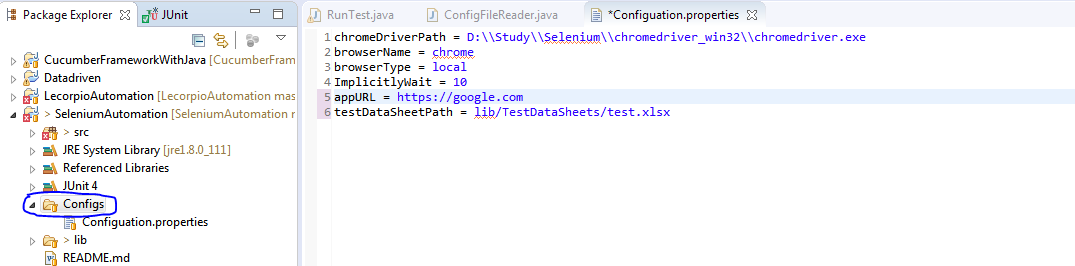
First of all we have to create one configuratioj file. Please follow below step.


  1. Create Configs folder under src folder
  2. Right click on Configs folder
  3. Go to New > File
  4. Give file name 'Configuration.properties'

Now add parameters which you are going to use in your framework.


Now, we have to create one method to access all these values of parameters. For that I have created one class 'ConfigFileReader'. I have created all methods for accessing values that class.


 1
 2
 3
 4
 5
 6
 7
 8
 9
10
11
12
13
14
15
16
17
18
19
20
21
22
23
24
25
26
27
28
29
30
31
32
33
34
35
36
37
38
39
40
41
42
43
44
45
46
47
48
49
50
51
52
53
54
55
56
57
58
59
60
61
62
63
64
65
66
67
68
69
70
71
72
73
import java.io.BufferedReader;
import java.io.FileNotFoundException;
import java.io.FileReader;
import java.io.IOException;
import java.util.Properties;

public class ConfigFileReader 
{
 
 private Properties properties;
 private final String propertyFilePath= "Configs/Configuation.properties";
 
 
 public ConfigFileReader(){
  BufferedReader reader;
  try {
   reader = new BufferedReader(new FileReader(propertyFilePath));
   properties = new Properties();
   try {
    properties.load(reader);
    reader.close();
   } catch (IOException e) {
    e.printStackTrace();
   }
  } catch (FileNotFoundException e) {
   e.printStackTrace();
   throw new RuntimeException("Configuration.properties not found at " + propertyFilePath);
  }  
 }
 
 public String getChromeDriverPath()
 {
  String driverPath = properties.getProperty("chromeDriverPath");
  if(driverPath!= null) return driverPath;
  else throw new RuntimeException("driverPath not specified in the Configuration.properties file.");  
 }
 
 public String getBrowserName()
 {
  String browserName = properties.getProperty("browserName");
  if(browserName!= null) return browserName;
  else throw new RuntimeException("Browser name not specified in the Configuration.properties file.");  
 }
 
 public String getBrowserType()
 {
  String browserType = properties.getProperty("browserType");
  if(browserType!= null) return browserType;
  else throw new RuntimeException("Browser Type not specified in the Configuration.properties file.");  
 }
 
 public long getImplicitlyWait()
 {  
  String implicitlyWait = properties.getProperty("ImplicitlyWait");
  if(implicitlyWait != null) return Long.parseLong(implicitlyWait);
  else throw new RuntimeException("implicitlyWait not specified in the Configuration.properties file.");  
 }
 
 public String getApplicationUrl()
 {
  String url = properties.getProperty("appURL");
  if(url != null) return url;
  else throw new RuntimeException("APP URL not specified in the Configuration.properties file.");
 }
 
 public String getTestDataSheetPath()
 {
  String path = properties.getProperty("testDataSheetPath");
  if(path != null) return path;
  else throw new RuntimeException("Test data sheet not specified in the Configuration.properties file.");
 }

}

You can see I have created separate function for access value of particular parameter. So you have to create separate function for all parameters. 

Please add comment if you have any question.

How to Compare Two Images in Selenium

Some time in testing we have to do image comparision as verification point. So, in this blog I expalin how to compare two images in selenium.

I have created one function for compare two images. you can use directly into your framework.

first of all you have to import below packages into your code.

import java.awt.image.BufferedImage;
import java.io.File;
import javax.imageio.ImageIO;

Now, you can use below function for comparison of two images.

 1
 2
 3
 4
 5
 6
 7
 8
 9
10
11
12
13
14
15
16
17
18
19
20
21
22
23
24
25
26
27
28
29
30
public boolean mCompareImages(BufferedImage img1, BufferedImage img2)
 {
  boolean bCompareImage = true;
  try
  {
   if (img1.getWidth() == img2.getWidth() && img1.getHeight() == img2.getHeight())
   {
    for (int i = 0; i < img1.getWidth(); i++)
    {
     for (int j = 0; j < img1.getHeight(); j++)
     {
      if (img1.getRGB(i, j) != img2.getRGB(i, j))
      {
       bCompareImage = false;
      }
     }
    }
   }
   else
   {
    bCompareImage = false;
   }   
  }
  catch(Exception E)
  {
   bCompareImage = false;
  }
  
  return bCompareImage;
 }


Here, we are comparing tow images first in terms of heights and width. If Height and Width both are same then we are comparing RGB components of both images. If RGB components are same then images are same otherwise it is different.

Function is return Boolean value. If images are same then true and not same then false.

Please add comment if you have any question.

Monday, 26 February 2018

Implicit Wait Vs. Explicit Wait Vs. Fluent Wait

When we do automation in selenium then waits for element is most important part in automation.

Why We Need Wait In Selenium?

When any page is load then different elements take different time to load or visible on page. So, if we do not handle wait in automation then "ElementNotVisibleException" exception will be thrown.

So, we have to handle waits in automation framework to overcome synchronization problem.

We can handle wait in three ways.
  1. Implicit Wait
  2. Explicit Wait
  3. Fluent Wait

Implicit Wait :

This wait will tell web driver to wait certain amoutn of time before thrown "ElementNotVisibleException" exception.

Syntax:

1
driver.manage().timeouts().implicitlyWait(TimeOut, TimeUnit.SECONDS);

Example:

 1
 2
 3
 4
 5
 6
 7
 8
 9
10
11
12
13
14
15
16
17
18
19
public class Test 
{
 
 public WebDriver driver;

 @Test
 public void TestWait() throws InterruptedException 
 {
 System.setProperty ("webdriver.chrome.driver",".\\chromedriver.exe" );
 driver = new ChromeDriver(); 
 driver.manage().timeouts().implicitlyWait(10,TimeUnit.SECONDS) ;

 driver.findElement(By.id("txtUserId")).sendKeys(vUsername);   
 driver.findElement(By.id("txtPassword")).sendKeys(vPassword);
 driver.findElement(By.id("btnSignIn")).click();

 }

}

In above example, you can see timeout is for 10 seconds. So web driver will wait for 10 seconds if any element is not visible on page and after 10 seconds it will throw "ElementNotVisibleException" exception.


Explicit Wait :

This wait will tell web driver to wait till certain condition (Expected Condition) or maximum amount of time before throwing an "ElementNotVisibleException" exception.

Explicit wait is smart type of wait but it can only be applied specific elements. Once we declared explicit wait then we have to declare "Expected Condition" till which we want to wait.

Syntax:


1
WebDriverWait wait = new WebDriverWait(WebDriver,TimeOut);

Example:


 1
 2
 3
 4
 5
 6
 7
 8
 9
10
11
12
13
14
15
16
17
18
19
20
21
22
public class Test 
{
 
 public WebDriver driver;

 @Test
 public void TestExplicitWait() throws InterruptedException 
 {
 System.setProperty ("webdriver.chrome.driver",".\\chromedriver.exe" );
 driver = new ChromeDriver(); 
 
 WebDriverWait wait = new WebDriverWait(driver, 15);

 driver.findElement(By.id("txtUserId")).sendKeys(vUsername);   
 driver.findElement(By.id("txtPassword")).sendKeys(vPassword);

 WebElement SignIn = wait.until(ExpectedConditions.elementToBeClickable(By.id("btnSignIn")));

 SignIn.click(); 

 }
}

In above example, you can see first we set webdriverwait for 15 seconds. It means it will wait maximum 15 seconds then we set expected condition "elementToBeClickable" for SignIn element.

There are many expected conditions. We can use any of them as per our requirement.


Fluent Wait :

The fluent wait will tell the web driver to wait for a condition, as well as the frequency with which we want to check the condition before throwing an "ElementNotVisibleException" exception.

Frequency: it is repeat cycle with the time to verify the condition at the regular interval of time.

you can also specify Exception which you want to ignore to throw when webdriver is checking for particular element.

Syntax:


1
2
3
4
Wait wait = new FluentWait(WebDriver reference)
.withTimeout(timeout, SECONDS)
.pollingEvery(timeout, SECONDS)
.ignoring(Exception.class);

Example:


 1
 2
 3
 4
 5
 6
 7
 8
 9
10
11
12
13
14
15
16
17
18
19
20
21
22
23
24
25
26
27
28
29
30
31
32
33
public class Test 
{
 
 public WebDriver driver;

 @Test
 public void TestFluentWait() throws InterruptedException 
 {
 System.setProperty ("webdriver.chrome.driver",".\\chromedriver.exe" );
 driver = new ChromeDriver(); 
 
 Wait wait = new FluentWait(driver)
   .withTimeout(20, TimeUnit.SECONDS)    
   .pollingEvery(3, TimeUnit.SECONDS)    
   .ignoring(NoSuchElementException.class);

 driver.findElement(By.id("txtUserId")).sendKeys(vUsername);   
 driver.findElement(By.id("txtPassword")).sendKeys(vPassword);

 WebElement SignIn = wait.until(new Function() {
 
        public WebElement apply(WebDriver driver) {
 
        return driver.findElement(By.id("btnSignIn"));
 
        }
 
       });

 SignIn.click(); 

 }
}


In above example, you can see maximum timeout is set for 20 seconds.
Frequency is set for every 3 seconds by ignoring "NoSuchElementExecption".

Driver Setup with selenium wrapper automation

Driver setup is very important and necessary in any selenium automation.

We can setup driver with direclty write below line.

WebDriver vDriver = new FirefoxDriver();

but if we want to driver for other browser then we have to change code and call driver for that browser. It is not good approach that every time we change code as epr browser requirement.

SO, rather change code every time we can create method for setup driver and pass browser name as parameter for whcih browser we want. It is right approach to setup driver in any selenium automation framework.


I have created one call call 'SetupDriver' and create two methods in it. One for simple driver and second is for remote driver.

You can use this call directly and your automation framework. Whenever you want to setup driver then simple create object of 'SetupDriver' class and call method as per your requirement.


  1
  2
  3
  4
  5
  6
  7
  8
  9
 10
 11
 12
 13
 14
 15
 16
 17
 18
 19
 20
 21
 22
 23
 24
 25
 26
 27
 28
 29
 30
 31
 32
 33
 34
 35
 36
 37
 38
 39
 40
 41
 42
 43
 44
 45
 46
 47
 48
 49
 50
 51
 52
 53
 54
 55
 56
 57
 58
 59
 60
 61
 62
 63
 64
 65
 66
 67
 68
 69
 70
 71
 72
 73
 74
 75
 76
 77
 78
 79
 80
 81
 82
 83
 84
 85
 86
 87
 88
 89
 90
 91
 92
 93
 94
 95
 96
 97
 98
 99
100
101
102
103
104
105
106
107
108
109
110
111
112
113
114
115
116
117
118
119
120
121
122
123
124
125
126
127
128
129
130
131
132
133
134
135
136
137
138
139
140
141
142
143
144
145
146
147
148
149
150
151
152
153
154
155
156
157
158
159
160
161
162
163
164
165
166
167
168
169
public class SetupDriver 
{

 public WebDriver vDriver = null;
 public Proxy ZAPproxy;

 // Returs the webdriver. Input parameters are 
 // 1)vBrowser - Browser Type like
 // 2)vProxy - True / False
 public WebDriver mGetRemoteDriver(String vBrowser, boolean vProxy) 
 {

  // browser - chrome
  if (vBrowser.equalsIgnoreCase("chrome")) {
   DesiredCapabilities capability = DesiredCapabilities.chrome();

   if (vProxy) 
   {
    ProxyServer BrowserMobproxyServer;
    BrowserMobproxyServer = new ProxyServer(9090);
    try {
     BrowserMobproxyServer.start();
    } catch (Exception e1) {
     System.out.println("Exception during start of BrowserMobProxy");
     e1.printStackTrace();
    }
    Proxy BrowserMobproxy;
    BrowserMobproxy = new Proxy();
    BrowserMobproxy.setHttpProxy("localhost:8080");
    BrowserMobproxy.setSslProxy("localhost:8080");
    capability.setCapability(CapabilityType.PROXY, BrowserMobproxy);
   }
   ChromeOptions options = new ChromeOptions();   
   options.addArguments(Arrays.asList("--start-maximized", "allow-running-insecure-content", "ignore-certificate-errors"));
   capability.setCapability(ChromeOptions.CAPABILITY, options);
   capability.setBrowserName("chrome");
   
   try 
   {
    vDriver = new RemoteWebDriver(new URL("http://localhost:4444/wd/hub"), capability);
   }
   catch (UnreachableBrowserException E)
   {    
    System.out.println("Unreachable browser exception in class GetDriver for chrome browser");    
   }
   catch (MalformedURLException E)
   {    
    System.out.println("Malformed URL exception in class GetDriver for chrome browser");    
   }
  }

  // browser - firefox
  if (vBrowser.equalsIgnoreCase("firefox")) {
   DesiredCapabilities capability = DesiredCapabilities.firefox();
   capability.setBrowserName("firefox");

   if (vProxy) 
   {
    ZAPproxy = new Proxy();
    ZAPproxy.setAutodetect(false);
    ZAPproxy.setProxyType(ProxyType.MANUAL);
    ZAPproxy.setHttpProxy("localhost:8080");
    ZAPproxy.setSslProxy("localhost:8080");
    capability.setCapability(CapabilityType.PROXY, ZAPproxy);
   }
   
   FirefoxProfile fxProfile = new FirefoxProfile();

   fxProfile.setPreference("browser.download.folderList", 2);
   fxProfile.setPreference("browser.download.manager.showWhenStarting", false);
   fxProfile.setPreference("browser.download.dir", "c:\\mydownloads");
   fxProfile.setPreference("browser.helperApps.neverAsk.saveToDisk",
     "application/pdf,text/csv,application/vnd.openxmlformats-officedocument.spreadsheetml.sheet,application/ms-excel");
   fxProfile.setPreference("browser.helperApps.alwaysAsk.force", false);
   // Disables PDF preview
   fxProfile.setPreference("pdfjs.disabled", true);
   fxProfile.setPreference("plugin.scan.plid.all", false);
   fxProfile.setPreference("plugin.scan.Acrobat", "99.0");

   capability.setCapability(FirefoxDriver.PROFILE, fxProfile);

   try 
   {
    vDriver = new RemoteWebDriver(new URL("http://localhost:4444/wd/hub"), capability);
   }
   catch (MalformedURLException E)
   {
    System.out.println("Malformed URL exception in class GetDriver for firefox browser");    
   }
   catch (UnreachableBrowserException E) {
    System.out.println("Unreachable browser exception in class GetDriver for firefox browser");    
   }
  }  

  // browser - internet explorer
  if (vBrowser.equalsIgnoreCase("internet explorer")) 
  {
   DesiredCapabilities capability = DesiredCapabilities.internetExplorer();
   capability.setBrowserName("internet explorer");
   try 
   {
    vDriver = new RemoteWebDriver(new URL("http://localhost:4444/wd/hub"), capability);
   } 
   catch (MalformedURLException E)
   {
    System.out.println("Malformed URL exception in class GetDriver for internet explorer browser");    
   }
   catch (UnreachableBrowserException E)
   {
    System.out.println("Unreachable browser exception in class GetDriver for internet explorer browser");    
   }
  }

  return vDriver;
 }
 
 public WebDriver mGetDriver(String vBrowser, boolean vProxy)
 {
  if (vBrowser.equalsIgnoreCase("chrome"))
  {
   try 
   {
    System.setProperty("webdriver.chrome.driver", "path of chrome driver");
    vDriver = new ChromeDriver();
   } 
   catch (UnreachableBrowserException E) 
   {    
    System.out.println("Unreachable browser exception in class GetDriver for chrome browser");    
   } 
   catch (Exception E) 
   {    
    System.out.println("Exception in class GetDriver for chrome browser");    
   }
  }
  else if (vBrowser.equalsIgnoreCase("firefox"))
  {
   try 
   {    
    vDriver = new FirefoxDriver();
   } 
   catch (UnreachableBrowserException E) 
   {    
    System.out.println("Unreachable browser exception in class GetDriver for firefox browser");    
   } 
   catch (Exception E) 
   {    
    System.out.println("Exception in class GetDriver for firefox browser");    
   }
  }
  else if (vBrowser.equalsIgnoreCase("internet explorer"))
  {
   try 
   {
    System.setProperty("webdriver.ie.driver", "path of ie driver");
    vDriver = new InternetExplorerDriver();
   } 
   catch (UnreachableBrowserException E) 
   {    
    System.out.println("Unreachable browser exception in class GetDriver for IE browser");    
   } 
   catch (Exception E) 
   {    
    System.out.println("Exception in class GetDriver for IE browser");    
   }
  }
    
  return vDriver;
 }
}

You can also read below other article on selenium wrapper automation.

How to handle drop down using selenium wrapper automation

Selenium Wrapper Automaton


Popular